Daily Planner, To Do List
- 4.6
- Rating
- 1.00M
- Installs
- Free
- Price
 Analysis by App-foxy
I use a planner differently from a simple checklist. A checklist tells me what exists; a useful planner helps me decide what deserves attention, when I can realistically do it, and what to do when the day goes off track. Daily Planner, To Do List aims to cover that wider routine by bringing tasks, daily planning, journaling, diary-style notes, and schedule templates into one productivity app. After spending time with it, I see the appeal: it is less rigid than a traditional task manager and more structured than writing reminders in a notes app.
Daily Planner, To Do List is a free productivity app from Simple Productivity Apps, available for users aged Everyone. It has built a strong audience, with a 4.6 average from around 148 thousand ratings and more than one million installs. Those numbers suggest that its straightforward approach works for many people, especially anyone who wants a visible daily routine rather than an elaborate project-management system.
My overall impression is positive, but it depends on what you expect from a planner. This is not the choice I would make for a team coordinating complex projects, and it may feel too busy if all you want is a tiny list of reminders. For personal routines, study planning, appointments, reflection, and days that need a little more shape, it has a practical balance. The most important question is whether you want to manage tasks in isolation or understand how those tasks fit into your day.
You May Also Like

 Blood Strike: 2.5 Anniversary
Blood Strike’s Loadouts Turn Every Drop Into a Tactical Gamble
A close look at Blood Strike’s custom loadouts: how fast access to signature weapons reshapes its battle royale rhythm, rewards preparation, and narrows the gap between fights.

 Pandora - Music & Podcasts
Pandora’s Music Is Easy to Start, but Harder to Recover
Pandora’s strength is its low-effort path from a seed to a station. Its weak spot is how much confidence it asks you to place in connection, setup, and quiet recovery.

 8 Ball Pool
 Is Built on Rivalries, Rematches, and Routine
A close look at the rivalries, rematches, shared routines, and unanswered safety questions that turn a quick pool match into a persistent mobile community.

 Samsung Music
’s Quiet Strength Is Playing What You Already Own
Its reach comes less from spectacle than from dependable access to a personal library. That simplicity is both the app’s strongest retention engine and its ceiling.

 AccuWeather: Weather Radar
AccuWeather Review: A Quick, Clear Forecast for Everyday Decisions
For everyday plans, the best forecast is the one you can understand quickly. AccuWeather makes rain timing, radar, and local conditions easy to act on, with a few trade-offs.

 Hill Climb Racing
Why Hill Climb Racing Still Turns Crashes Into One More Run
A tiny car, a bumpy hill and one more upgrade: Hill Climb Racing keeps resurfacing because its simple chaos makes every near-miss feel personal.
More From Our News Desk



How the planner feels during everyday use
I find the everyday experience most useful when I treat the planner as a place to make a few decisions, not as a record of everything I do. A practical habit is to end each session by choosing one clear next action and leaving the rest for later review; that keeps the daily page from turning into another obligation. This also makes it easier to judge whether its broader format genuinely suits the way I plan.
A quick start without an intimidating setup
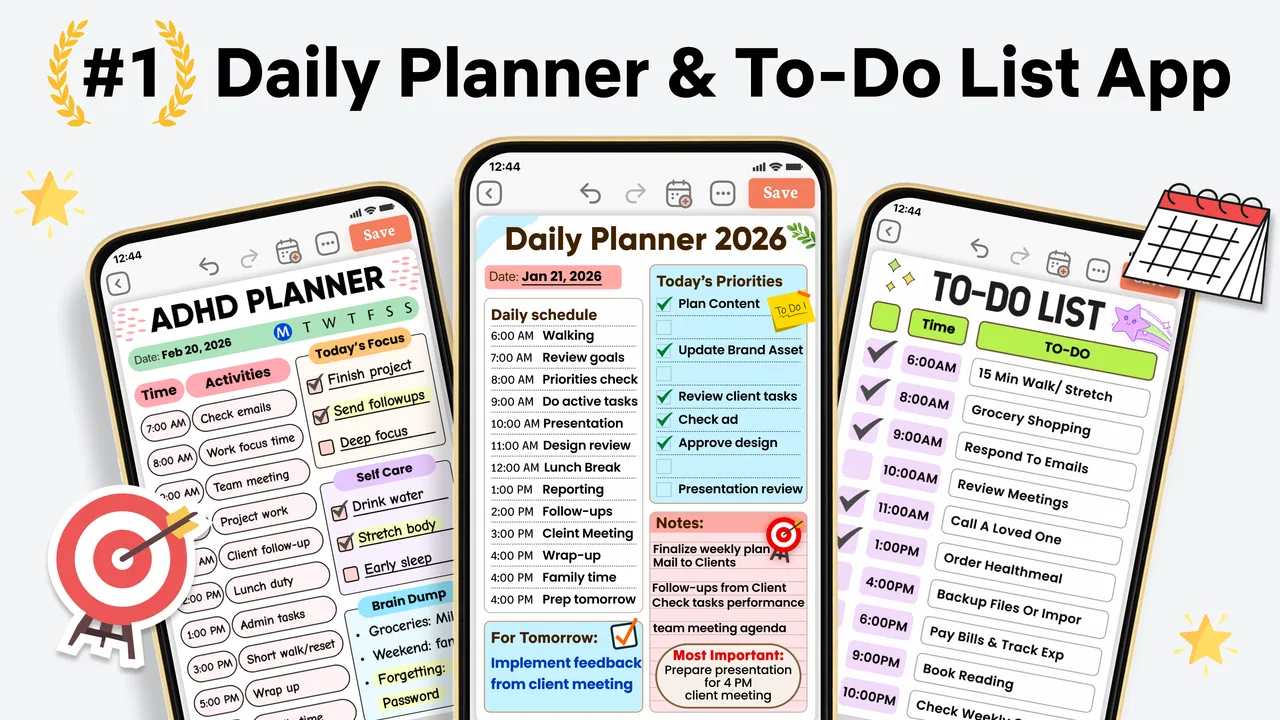
The first strength I noticed is that the app is easy to approach. A daily planner can become counterproductive when it asks me to design a complete productivity system before I have written down my first task. Here, the central idea is familiar: look at the day, add what needs doing, and use the available planning and writing areas to give the day more context.
That simplicity matters for people who abandon complicated organizers. I can imagine opening it in the morning, adding a work responsibility, a household errand, a personal goal, and a short note about how I feel. The result is more useful than four separate apps because the items belong to the same day. I do not have to remember which application contains the task, the reflection, or the schedule outline.
The experience feels best when I use it as a daily reset rather than as a giant archive of every obligation in my life. I would open it at the beginning of the day to choose priorities, check it again when plans change, and use the journal or diary side in the evening. That rhythm keeps the interface purposeful. If I tried to turn every small thought into a formal entry, the system would become harder to maintain.
Where speed matters most
For this kind of app, perceived speed is less about flashy transitions and more about whether I can capture an idea before it disappears. A planner loses its value if adding a task feels like a chore. Daily Planner, To Do List is most convincing when used for quick, ordinary actions: noting a call, outlining a study session, recording a personal intention, or writing down the next step after a meeting.
I also like the distinction between planning and reflection. A task says what I need to do, while a journal entry can explain why the day felt difficult or what helped. That separation prevents every entry from becoming a sterile checkbox. It also makes the app more suitable for users who want a gentle record of their routine, not just a productivity scoreboard.
There is a trade-off here. A broad app that combines a planner, to-do list, diary, and templates naturally has more areas to explore than a minimalist checklist. Someone who values absolute immediacy may prefer a dedicated reminder tool. I would choose this app when the extra context is useful, not when I need the fewest possible taps.
Handling a crowded day
The real test for a planner is not a calm Sunday with three easy tasks. It is the day when work, errands, appointments, and personal responsibilities compete for the same limited hours. This is where the daily format can help, because it encourages me to see the complete shape of the day instead of collecting disconnected reminders.
A realistic example would be a student with a morning class, an assignment to finish, groceries to buy, and a need to prepare for the next day. I would place the fixed commitment first, then break the assignment into a smaller action, reserve a realistic period for shopping, and leave space for preparation. The journal area could hold a quick note about what made the assignment difficult. That small record becomes useful later: it may show that the problem was not motivation but an unclear first step.
This is one of the app’s less obvious strengths. A daily planner can reveal overloaded expectations before they become missed tasks. If I repeatedly move the same item forward, that is a signal to reduce its scope or give it a proper time block. A conventional to-do list often hides this pattern because unfinished items simply remain in a long column.
Templates as a starting point, not a rulebook
The schedule-planning templates are particularly useful for people who know they need structure but do not know how to create it. I would use one as a starting framework for a study day, a workday, or a routine that needs repeating. The important point is not to copy a template mechanically. I would remove anything that does not fit my actual life and keep only the prompts that make decisions easier.
Templates can also prevent the blank-page problem. Instead of asking myself, “How should I organize today?” I can begin with a familiar pattern and adjust it. That is helpful for users with attention difficulties, including people looking for ADHD-friendly planning support. A template cannot solve attention, energy, or time-estimation problems by itself, but it can reduce the number of choices required before starting.
My advice is to treat a template as scaffolding. If it contains too many steps, simplify it immediately. A planner should make the next action clearer, not create another routine that feels like homework. The app works better when I adapt its structure to my energy and responsibilities rather than trying to perform an ideal version of productivity.
Heavy-use moments and the cost of flexibility
During a busy day, the app’s combined approach is both its advantage and its main source of friction. I may want to add a task, review the schedule, write a note, and record a reflection in one session. Having those functions together is convenient, but it also means I need to stay aware of which kind of entry I am creating. A quick task should remain a quick task; it does not need to become a full diary entry.
I found that the best workflow is to capture first and organize later. When I am walking between commitments or thinking about something else, I would write the shortest useful version of the task. Later, I can clarify the wording and decide whether it belongs in the schedule, the to-do list, or a journal entry. This avoids spending valuable attention formatting an idea before I know what it means.
For heavy personal use, I would also keep the daily page focused. Too many completed items, reflections, and template prompts can make the day feel like a report. The app gives me room for detail, but that does not mean every detail deserves a permanent entry. Its flexibility rewards users who edit their system regularly.
Reliability and recovering from an imperfect day
Reliability in a planner is not only about opening consistently. It is also about helping me recover when I forget to check it, underestimate a task, or lose control of the schedule. The daily format supports that recovery because I can return to the current day, identify what remains, and make a fresh plan instead of treating the entire system as failed.
I would use a simple recovery rule: move only the tasks that still matter, rewrite anything that has become vague, and delete anything that was never truly necessary. This is more effective than carrying an untouched backlog forward indefinitely. The journal side can help here too, because a short note about what disrupted the day may reveal a recurring obstacle.
That said, I would not rely on any planner as my only protection against critical deadlines without checking how its reminders and scheduling behavior fit my needs. A daily organizer is excellent for intentional planning, but urgent appointments and time-sensitive responsibilities may be better supported by a dedicated calendar or alarm system. The app can be the place where I decide what matters; another tool may still be better at interrupting me at exactly the right moment.
Resource demands and device constraints
The app supports devices running Android 8.0 or later, which makes it accessible to people who are not using the newest phone. That is useful for anyone keeping an older device as a secondary handset or trying to avoid upgrading solely for a planner. I would still keep expectations sensible: an older phone may not feel as immediate as a recent one when several parts of a larger productivity app are being used in one session.
Because the app combines several personal-organization functions, I would judge resource use by practicality rather than expecting it to behave like a bare text note. A planner with schedules, tasks, diary writing, and templates has more to manage than a single-purpose checklist. In normal use, I would avoid keeping unnecessary pages or routines open and would give the app a clean, focused workflow.
Version 98.0 shows that the product is presented as a mature, actively versioned app rather than a one-screen experiment. Still, a version number alone does not tell me how it will behave on every phone. Users with limited storage, older hardware, or aggressive battery management should pay attention to their own device experience, especially if they expect frequent background reminders or long writing sessions.
The app is free to install, with optional in-app purchases ranging from $3.99 to $47.99 per item. That makes it easy to try the core experience before deciding whether the additional paid elements fit my budget. I would not pay simply because I like the idea of a planner; I would first use it for several real days and see whether its templates and combined workflow actually replace tools I already use.
Who benefits most from this format
I think this app is a strong match for people who want a personal daily command center. Students can combine assignments with study intentions and reflections. Remote workers can separate fixed meetings from flexible tasks. People managing household responsibilities can keep errands and routines visible without losing the personal context behind them. Anyone who likes writing as part of planning may prefer this over a task manager that treats every entry as a checkbox.
It is also a sensible option for users who struggle with starting. The combination of a daily view and templates can turn an undefined goal into a smaller sequence of decisions. I would especially recommend it to someone who has tried a complex productivity method, found it exhausting, and now wants a more approachable structure with room for personal notes.
I would skip it if I need collaborative assignments, detailed project dependencies, advanced team permissions, or a highly specialized calendar workflow. It is also not my first choice for someone who wants a completely invisible reminder system that quietly handles everything in the background. The app asks me to participate in planning, and that is a benefit only if I am willing to review and adjust my day.
How it compares with familiar alternatives
Compared with a basic notes app, Daily Planner, To Do List gives daily organization a clearer shape. Notes are excellent for free writing, but they can become a pile of unrelated pages. This app is better when I want a task, a schedule idea, and a reflection to belong to the same daily routine.
Compared with a minimalist to-do list, it offers more emotional and practical context. A simple list may be faster for capturing ten errands, while this app is more useful when I want to decide which errands fit today and record how the plan worked. The trade-off is that the broader experience may feel unnecessary for users who never journal or use templates.
Compared with a full calendar, it feels more personal and less rigid. A calendar is usually the better home for appointments that must happen at a precise time, while this planner is better for intentions, flexible tasks, routines, and self-review. I would happily use both if my day contains many fixed commitments: the calendar protects the schedule, and this app helps me prepare for it.
Compared with a specialized habit or focus tool, it may not go as deeply into one behavior. Its advantage is breadth. I can keep the day’s responsibilities and reflections together rather than building a separate system for every part of my life. Whether that is efficient or excessive depends on how much structure I actually use.
Small workflows that make it more useful
One workflow I recommend is the three-pass day. In the first pass, I capture everything without trying to make the list perfect. In the second, I identify the few actions that genuinely define a successful day. In the third, usually at night, I write a short reflection and remove tasks that no longer deserve attention. This prevents planning from becoming procrastination.
A second useful approach is to turn repeated failures into template changes. If I regularly plan too many demanding tasks before lunch, I would alter the template rather than blaming myself each time. If I forget preparation steps, I would add a prompt for them. This makes the planner learn from my behavior instead of forcing me to repeat the same unrealistic schedule.
A third is to separate “must happen” from “would be helpful.” Even if the app gives me one daily space, I can keep the wording distinct. That reduces the guilt created by treating every optional ambition as a deadline. It also makes recovery easier: when the day collapses, I can protect the essentials and postpone the rest without feeling that the entire plan has failed.
My performance verdict
Daily Planner, To Do List feels most effective as a calm, personal planning workspace rather than a high-pressure productivity machine. Its speed expectations are reasonable for quick entries, its broad toolkit helps during crowded days, and its daily structure makes recovery less dramatic when plans change. The main performance trade-off is conceptual rather than technical: more functions create more flexibility, but they also require a little judgment about what belongs where.
The Android 8.0 minimum makes the app approachable for a wide range of devices, while the current version, 98.0, gives the impression of a developed product. I would still test it on my own phone before building my entire routine around it, particularly if the device is older or I depend heavily on reminders. The free entry point is helpful, and the optional purchases mean I can evaluate the workflow before spending anything.
My recommendation is straightforward: try it if you want tasks, schedules, templates, and personal reflection to live together. Use it for a week of ordinary life, including at least one busy day, rather than judging it from a perfectly organized morning. If you find yourself returning to the daily page, adjusting plans honestly, and using the journal to understand what happened, it may become a dependable part of your routine. If you only need fast reminders or advanced project coordination, a simpler or more specialized alternative will probably serve you better.
For me, the app’s strongest idea is that productivity is not just completing items. It is choosing a manageable day, noticing why a plan worked or failed, and starting again without rebuilding everything. That combination of planning and recovery is where this app earns its place.
FAQs for Daily Planner, To Do List
01What is Daily Planner, To Do List, and what can I use it for?
Daily Planner, To Do List is designed to help you organize everyday responsibilities, appointments, habits, and personal goals in one place. After exploring the app, its main value is the simple task-planning approach: you can create activities, arrange them by date or priority, and check them off as you complete them. It can be useful for work, school, household planning, and general productivity.
02Can I use Daily Planner, To Do List without an internet connection?
The app is primarily intended for planning tasks directly on your device, so many basic features may remain available when you are offline. You should generally be able to view existing tasks and add or edit routine items without a constant connection. However, features such as synchronization, backups, advertisements, account services, or sharing may require internet access, depending on the version installed.
03Does Daily Planner, To Do List support reminders and recurring tasks?
Reminder and recurring-task support is one of the most important details to check before downloading, especially if you depend on the app for appointments or deadlines. Daily Planner, To Do List may allow you to assign dates, times, notifications, or repeated schedules, but the exact options can vary by device and app version. Review notification permissions and settings to ensure alerts work reliably.
04Is Daily Planner, To Do List free to download and use?
Daily Planner, To Do List can typically be downloaded at no initial cost, allowing users to try its basic planning tools before deciding whether it meets their needs. Depending on the platform and current release, the app may include advertising, optional purchases, premium functions, or limitations on certain features. Check the official store listing for the latest pricing and subscription information.
05Is my personal planning information safe in Daily Planner, To Do List?
Because planner apps can contain private schedules, work details, addresses, and personal goals, privacy should be considered before entering sensitive information. Review the app’s permissions and privacy policy to understand whether data is stored locally, synchronized online, or shared with service providers. It is also sensible to use a device lock and avoid recording confidential information unless you trust the app’s data practices.
Pros
- Clean layout makes daily tasks easy to scan and manage.
- Recurring tasks help automate regular routines and habits.
- Quick task entry is useful when planning on the go.
- Priority options make important items easier to spot.
- A focused planner can reduce reliance on scattered notes.
Cons
- Some useful planning tools may be limited to premium users.
- Large task lists can become difficult to organize without advanced filters.
- Notifications may feel excessive if many reminders are enabled.
- It may take time to build an efficient planning routine.
- Calendar and task syncing may depend on device permissions or integrations.

Daily Planner, To Do List
Gallery